








Finding the right way to handle customer calls has become more complicated. Businesses can outsource their support to a provider that supplies trained agents, or they can invest in call center software and run the operation themselves. Both options can solve real problems, but they address different needs. Choosing the wrong one can leave you paying for technology you don’t have the staff to use or hiring people without the infrastructure they need to work efficiently.
At the same time, businesses are under increasing pressure to do more with both technology and their existing teams. Gartner’s survey of 321 customer service and support leaders found that 91% of customer service leaders were under pressure to implement AI in 2026. In a separate briefing, the company reported that more than 80% of organizations expect to reduce agent headcount within 18 months, mostly through attrition and hiring pauses. That doesn’t mean human support is disappearing. It means companies are looking for ways to handle more customer interactions without continually expanding their teams.
Technology isn’t necessarily making that equation simpler. Gartner predicts that by 2028, more than 50% of customer service organizations will double their technology spend without an equivalent reduction in talent costs. Labor remains a significant part of the cost as well. The U.S. Bureau of Labor Statistics puts the median hourly wage for a U.S. customer service representative at $21.53 as of May 2025, before benefits, management, or infrastructure. The challenge, then, isn’t simply deciding whether to spend more on people or technology. It’s figuring out which combination makes sense for your operation.
That’s where the right provider can make a difference. This guide compares the 12 best virtual call center providers in 2026, covering both outsourced services and software platforms. You’ll see what each provider is best suited for, where its strengths lie, what to verify before signing the contract, and how the different options compare on cost, delivery model, technology, and compliance. By the end, you’ll have a clearer idea of which vendors are worth considering and whether you need a staffed service, a software platform, or both.
Key Takeaways
- Virtual call center options fall into two categories: outsourced services that provide agents and management, and software platforms that provide the technology your own agents use. Some businesses need one, while others benefit from both.
- The right model depends on your biggest operational gap. Outsourced services are a better fit when you need staffing, specialized expertise, flexible capacity, or faster coverage. Software makes more sense when you already have agents but need better routing, dialing, automation, or analytics.
- Cost per resolution is more useful than cost per hour when comparing providers. Look beyond hourly rates and account for labor, benefits, recruiting, training, technology, telephony, implementation, AI usage, and the cost of agent turnover.
- Compliance can narrow your options significantly. If agents handle healthcare, payment, or other regulated data, verify certifications, BAAs, data handling controls, home-agent security requirements, and subcontractor practices before choosing a provider.
- Flexibility matters when demand changes. Seasonal or unpredictable volume can favor providers with distributed agent networks, while stable, specialized programs may benefit from dedicated teams with deeper product or industry knowledge.
- Don’t evaluate providers on features alone. Check their ramp timeline, quality management, escalation process, technology integration, delivery locations, and ability to scale or adjust staffing as your needs change.
- The article compares 12 leading providers in 2026, including eight outsourced service providers and four software platforms, to help you identify which options fit your operation and what to verify before signing.
What Is a Virtual Call Center?
A virtual call center is a customer support operation where agents work from home, distributed offices, or multiple locations instead of a single call center. The term can refer to either the technology used to run that operation or the outsourced service that provides the agents, which is where much of the confusion comes from.
- Virtual call center software provides the technology your team uses to handle calls. It can include automatic call distribution, interactive voice response (IVR), dialers, call recording, quality management, and reporting. You license the software and provide the agents.
- Virtual call center services are outsourced operations. The provider recruits, trains, schedules, and manages remote agents on your behalf and may use its own technology or work within your existing systems.
- Contact center platforms extend beyond voice to channels such as chat, email, SMS, and social messaging, with routing and reporting across those channels.
These options solve different problems. Software can improve routing and automation, but it won’t solve a staffing shortage. An outsourced team can add capacity quickly, but it won’t necessarily fix outdated routing or reporting. That’s why before comparing providers, it’s important to know whether you need people, technology, or both.
12 Best Providers of Virtual Call Center Services and Software at a Glance
The 12 providers below fall into two groups. The first eight are virtual call center service providers that supply agents and manage customer support operations. The remaining four are software platforms that provide the technology for routing, dialing, automation, and analytics while you provide the agents.
Use the first table if you need additional people or want to outsource the operation. Use the second if you already have a team but need better call center technology. If you’re dealing with both staffing and technology gaps, the tables can also help you identify providers that may cover both sides of the operation.
Table A: Best virtual call center service providers
| Provider | Best for | Delivery model | What sets it apart |
|---|---|---|---|
| Helpware | Regulated mid-market CX operations that need people, AI, and engineering from one partner | Onshore, nearshore, offshore, and hub-and-spoke delivery across 19 locations | Three integrated divisions covering CX, AI, and Tech under one contract |
| TP (formerly Teleperformance) | Global enterprise programs spanning multiple markets | Global delivery; publicly listed on Euronext Paris | Scale and breadth across customer experience, back office, and business process services |
| Concentrix | Enterprises that want CX operations connected to technology and design engineering | Global, operating across more than 70 markets | More than 2,000 clients across CX, automation, analytics, and technology services |
| TTEC | Buyers that want contact center technology and staffed operations from one vendor | Global, through TTEC Digital and TTEC Engage | Technology consulting and platform services combined with staffed operations |
| TaskUs | Digital-native brands that need trust and safety alongside customer support | About 60,400 people across 30 locations in 13 countries as of June 2025 | Content moderation, customer support, and AI operations at scale |
| Liveops | Seasonal or unpredictable inbound volume | Distributed network of independent U.S. agents, plus nearshore operations in Puebla, Mexico | Flexible capacity that can expand and contract with demand |
| Working Solutions | North American programs that need domestic at-home agents | At-home independent contractors across the U.S. and Canada since 1996 | Long-running onshore work-from-home model |
| SupportYourApp | SaaS, fintech, and ecommerce companies scaling technical support | Distributed teams supporting 60-plus operational languages | Security-focused support-as-a-service for technology brands |
Table B: Best virtual call center software platforms
| Platform | Best for | Strongest at | Verify before budgeting |
|---|---|---|---|
| Five9 | Outbound-heavy and blended contact centers | Dialing, routing, and workforce engagement at scale | Five9 states a 50-seat minimum and prices by concurrent user, with usage-based charges that may apply |
| Genesys Cloud CX | Large, multi-region service operations | Orchestration, workforce engagement, and journey management | Pricing is based on annual commitments, and some AI features use metered Experience tokens |
| RingCentral Contact Center | Mid-sized teams already using RingCentral for voice | Reporting and supervisor visibility across distributed teams | Current list pricing and which tier includes workforce management |
| Talkdesk | Teams prioritizing AI automation within the routing layer | Self-service automation and analytics | Current list pricing and what implementation services include |
Note that platform pricing can change frequently and may not include telephony, implementation, or premium AI usage. Check pricing info on the provider’s website.
Do You Need Services or Software? 6 Questions to Ask Yourself to Decide
Before comparing providers, take a look at your own operation. The right choice depends on what you’re missing, how your volume changes, how specialized the work is, and how quickly you need to add capacity. These six questions can help you determine whether you need outsourced services, software, or a combination of the two.
- Do you need more people or better technology? If you already have trained agents but your routing, dialing, or reporting tools are outdated, a software platform should be enough. If you have the technology but don’t have enough people to cover your queues, an outsourced service can fill the gap. If you’re missing both, you may need both.
- How predictable is your volume? Stable, predictable demand can make an in-house operation easier to manage. If volume rises and falls sharply because of seasons, campaigns, or other events, an outsourced provider with flexible staffing can make it easier to handle those peaks.
- How specialized is the work? Some interactions require little training, while others depend on deep knowledge of your industry or product. A password reset is relatively straightforward. A prior authorization appeal, chargeback dispute, or tier-three technical issue requires more specialized training and experience. The more specialized the work, the more important it is to find a provider with the right expertise and training capabilities.
- What compliance requirements apply? If agents handle protected health information, cardholder data, or personal data covered by GDPR, those requirements should shape your shortlist from the start. Check what certifications and security controls providers have in place, whether they’ll sign the required agreements, and how they protect data when agents work remotely.
- How quickly do you need coverage? Building a platform, recruiting agents, and training a new team can take months. A provider with an existing workforce may be able to add coverage more quickly. Ask for a documented ramp plan that shows when agents will begin taking calls and when the team is expected to reach full productivity.
- How will you measure the cost? An hourly rate doesn’t tell you what it costs to actually resolve a customer issue. Compare cost per resolution as well as cost per hour, and include technology, telephony, implementation, training, and turnover in the calculation. Gartner projects that generative AI cost per resolution will exceed $3 by 2030, higher than the cost of many offshore human agents, as data center costs rise and use cases become more complex. Automation can lower costs, but it isn’t automatically the cheaper option.
Which Option is Right for Your Operation?
The best choice depends on what your operation already has and what you’re trying to fix. This table shows where software, outsourced services, or a combination of both make the most sense.
| Your situation | Software alone | Outsourced service | Both |
|---|---|---|---|
| You have agents but an aging phone system | Strong fit | Weak fit | Usually unnecessary |
| You have no agents or system and need to launch quickly | Weak fit | Strong fit | Often the best option |
| You have predictable volume and deep product knowledge | Strong fit | Situational | Situational |
| You have seasonal peaks and a quieter baseline | Weak fit | Strong fit | Strong fit |
| You handle regulated data and need audited controls | Situational | Strong fit | Strong fit |
| You need 24/7 multilingual coverage | Weak fit | Strong fit | Strong fit |
There’s also a case for bringing outsourced work back in-house over time. In a Deloitte survey of more than 500 global business and technology executives, 70% of organizations said they had brought previously outsourced work back in-house during the previous five years to strengthen internal capabilities and reduce vendor markup. That doesn’t mean outsourcing is the wrong choice. It means your needs can change, so consider how easy it would be to bring the work back in-house if your priorities or internal capabilities change.
How We Evaluated the Virtual Call Center Service and Software Providers
We used the same criteria to evaluate all 12 providers, with more weight given to the factors that have the biggest impact on whether a provider is a good fit for your operation. The scorecard below shows what we considered and how much each factor contributed to the overall evaluation.
| Criterion | Weight | What we looked for |
|---|---|---|
| Delivery model fit | 25% | Onshore, nearshore, offshore, or distributed delivery options that match coverage needs and budget |
| Compliance and security | 20% | Publicly documented certifications, security controls, and evidence that can withstand an audit |
| Scaling speed and flexibility | 20% | Documented ramp timelines and the ability to expand or reduce capacity as demand changes |
| Domain expertise | 15% | Relevant experience in the provider’s target industries rather than generic call handling |
| Technology and AI integration | 10% | Whether the provider brings its own technology or can work with your existing systems |
| Transparency | 10% | Publicly verifiable information about locations, languages, certifications, and capabilities |
8 Best Virtual Call Center Service Providers
1. Helpware: best provider for regulated mid-market CX operations
Best for: Healthcare and telehealth, SaaS, ecommerce, and fintech companies that need trained agents, AI tooling, and engineering capacity from one partner.
Helpware is a business process management provider founded in 2015 and headquartered in Kentucky. It operates three divisions: Helpware CX for customer experience operations and consulting, Helpware AI for AI products and training data, and Helpware Tech for custom software solutions.
Core services: Virtual call center services, omnichannel and multilingual customer support, technical support, back-office operations, and sales and customer success programs.
Delivery and footprint: Helpware operates 19 locations across 11 countries and four continents, with onshore delivery in the United States and Puerto Rico, nearshore delivery in Guadalajara, Mexico, and offshore delivery in the Philippines, Ukraine, Poland, Albania, Georgia, Germany, and Uganda. Hub-and-spoke models are also available. Support covers 45+ languages. The company has more than 4,000 employees globally, including over 3,000 CX agents, 800+ developers, and 200+ AI specialists.
Why it ranks first: Helpware combines compliance, staffing, AI, and engineering capabilities under one organization. Its certifications and controls include SOC 2 Type II, ISO 27001, ISO 9001, HIPAA, GDPR, and PCI DSS. Helpware can scale engagements from a five- to 10-FTE pilot to 500+ FTE within 90 to 120 days, with 30- to 60-day pilot and proof-of-concept programs available first. Having AI and engineering capabilities alongside CX operations also allows workflow redesign and automation to be handled as part of the same engagement.
Measured outcomes: Across client engagements, Helpware has a 90% CSAT score, 86% employee satisfaction, and a 5+ year average client partnership. Case study results include a 44% reduction in average handling time and a 33% improvement in first-contact resolution. Among its clients are organizations like Headspace, HealthComp, NexHealth, Zendesk, Samsara, and Jam City.
Where Helpware may not be the right solution: Companies requiring very large-scale programs spanning tens of thousands of seats across 70+ markets may need a provider with broader global capacity. Helpware is well suited to mid-market and enterprise teams seeking integrated CX, AI, and technology services.
Bottom line: Helpware is a strong fit when compliance, domain expertise, and speed to scale matter more than sheer headcount, particularly when you want CX, AI, and engineering capabilities from one partner.
2. TP (Formerly Teleperformance): best for global enterprise scale
Best for: Multinational programs that need coverage across many markets and languages under one master agreement.
TP is a publicly listed global provider of digitally integrated business services, trading on Euronext Paris under TEP. The company adopted TP as its brand name as part of its transition from the Teleperformance name. Its services cover customer experience management, back-office services, and business process knowledge services.
TP’s global footprint makes it well suited to large programs that need to operate across many countries at the same time. For a large enterprise launching customer support in multiple markets with local-language coverage and centralized governance, its scale can simplify vendor management.
What to look for: Ask for the specific delivery sites assigned to your program and the account team that will manage it rather than relying on company-wide statistics. At this scale, the experience can vary significantly by location and program.
Bottom line: A strong choice for genuinely global, high-volume programs, but often more than a mid-market operation needs for one or two queues.
3. Concentrix: best for CX operations connected to technology
Best for: Enterprises that want customer experience operations connected to automation, analytics, and design engineering.
Concentrix is a global technology and services company serving more than 2,000 clients. Its services include CX process optimization, technology innovation and design engineering, front- and back-office automation, analytics, and business transformation across five primary verticals. As of 2026, Concentrix operates in more than 70 markets.
Concentrix combines customer experience operations with technology, analytics, and transformation services. That can make it a strong option when the engagement involves more than staffing, such as redesigning customer journeys or introducing AI automation.
What to look for: Clarify which services fall under the operational engagement and which are part of transformation or technology work. Make sure the pricing for each part is clearly defined.
Bottom line: A strong enterprise option when customer operations and a broader technology strategy need to develop together.
4. TTEC: best for combining technology and operations
Best for: Organizations that want contact center technology design and staffed delivery from a single vendor.
TTEC operates two businesses: TTEC Digital, which designs, builds, and operates omnichannel contact center technology, CRM, AI, and analytics solutions, and TTEC Engage, which provides customer engagement, acquisition, tech support, back-office, and fraud prevention services.
TTEC can combine technology implementation with staffed operations, which can be useful when a platform migration is happening alongside an operational change. Its Digital business also works with major contact center technology platforms.
What to look for: Determine whether you actually need both sides of the business. If you only need staffing or technology, using a provider that offers both may add unnecessary cost.
Bottom line: A good fit for organizations that want to combine a contact center technology project with an operational rebuild.
5. TaskUs: best for digital brands that need trust and safety
Best for: Technology, marketplace, gaming, and fintech companies where customer support operates alongside content moderation and AI operations.
TaskUs provides outsourced digital services and customer experience for technology companies. The company reported a worldwide headcount of approximately 60,400 people across 30 locations in 13 countries as of June 30, 2025.
TaskUs combines customer support with trust and safety and AI data operations. That combination can be useful for marketplaces, social platforms, and other digital businesses where these functions are closely connected.
What to look for: Check coverage for your specific languages and time zones, since the available site mix can vary by program.
Bottom line: A strong option for digital-native companies that need customer support alongside trust and safety or AI operations.
6. Liveops: best for seasonal and unpredictable volume
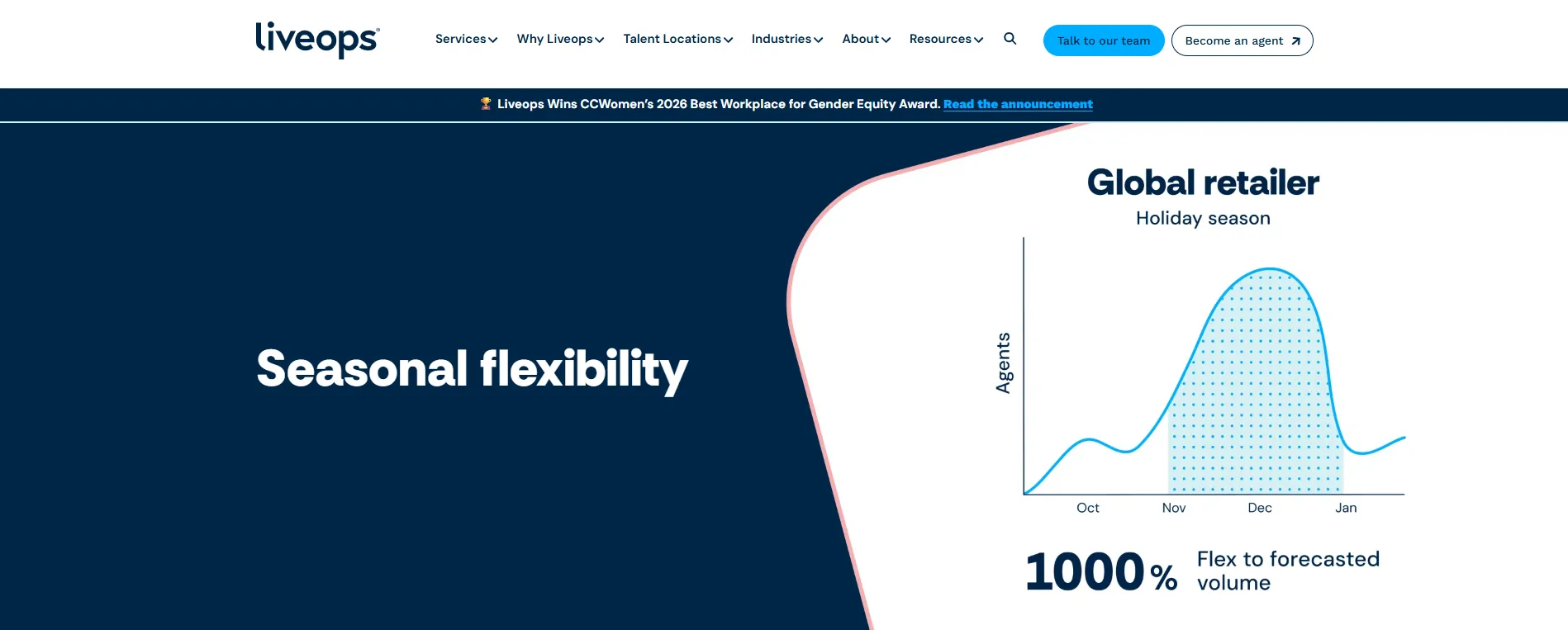
Best for: Retail, insurance, healthcare enrollment, and other operations with sharp demand peaks and quieter periods.
Liveops, headquartered in Scottsdale, Arizona, operates a virtual contact center using a distributed network of independent U.S.-based agents through its VirtualFlex platform. In March 2026, the company announced nearshore operations in Puebla, Mexico, adding bilingual coverage aligned with U.S. time zones.
Liveops is designed for organizations that need to increase capacity without maintaining the same staffing level year-round. That can be particularly useful during open enrollment, holiday periods, or other predictable demand spikes.
What to look for: Ask how the independent contractor model affects agent tenure, product knowledge, and quality consistency, particularly for complex or highly specialized queues.
Bottom line: A good fit when your main challenge is handling peaks in demand rather than maintaining baseline coverage.
7. Working Solutions: best for onshore at-home agents in North America
Best for: Brands that require domestic agents for compliance, accent, or contractual reasons.
Working Solutions has operated a network of at-home independent contractors, which the company calls PROs, across the United States and Canada since 1996. Agents handle calls, chats, and other support tasks from home offices.
Working Solutions has a long history of operating an onshore work-from-home model. For programs where U.S.-based agents are required by contract or customer expectations, it provides a focused alternative to global delivery providers.
What to look for: Check available capacity in your industry and how quickly the provider can recruit and train agents for specialized work.
Bottom line: A focused onshore option for companies that need at-home agents in the U.S. or Canada rather than a global delivery network.
8. SupportYourApp: best for technical support at growing technology companies
Best for: SaaS, fintech, and ecommerce companies that need to scale technical support as they grow.
SupportYourApp is a support-as-a-service provider that has worked with technology companies since 2010. The company brings together a team of more than 1,500 specialists providing support across chat, email, phone, and social channels in 60+ operational languages, alongside an AI voice agent product.
Its combination of technical support, language coverage, and security capabilities can make it a practical option for growing technology companies that have outgrown a small internal or offshore support team.
What to look for: Check the depth of tier-three technical support available for your specific product and whether the team can work with your product architecture and existing technical processes.
Bottom line: A solid fit for growing technology companies that need multilingual technical support without the complexity of a large enterprise provider.
4 Best Virtual Call Center Software Platforms
Five9
If your operation handles a lot of outbound calls or combines inbound and outbound work, Five9 is a strong option. The platform covers dialing, routing, IVR, workflow automation, and workforce engagement.
According to its pricing page, published prices are based on concurrent users, usage-based pricing may apply, and there is a minimum of 50 seats. That minimum is particularly important for smaller teams to consider before starting a sales conversation. Workforce engagement is licensed on a named-user basis, so the number of concurrent users and named users can differ as you add quality management.
Genesys Cloud CX
Genesys Cloud CX is designed for large, multi-region service operations that need orchestration, workforce engagement, and journey management in one platform.
Genesys offers tiered pricing based on an annual commitment, with a set allowance of AI Experience tokens per organization each month and metered consumption beyond that. If you’re considering the platform at enterprise scale, account for token usage alongside seat licenses rather than treating AI as a fixed-cost add-on.
RingCentral Contact Center
RingCentral Contact Center makes the most sense for mid-sized teams that already use RingCentral for voice and want deeper reporting, omnichannel routing, and better visibility into distributed agents.
The biggest advantage is consolidation: you can use one vendor for your phone system and contact center rather than managing separate platforms. Before building the business case, confirm current list pricing and which tier includes workforce management.
Talkdesk
Talkdesk is a good fit for teams that want AI automation built into the contact center rather than added as a separate tool. The platform focuses on self-service automation and analytics for medium-sized and enterprise omnichannel operations.
As with any contact center platform, look beyond the software license when budgeting. Confirm current pricing and exactly what implementation covers, since professional services can make up a significant share of first-year costs.
Compliance Concerns: What to Ask Before Remote Agents Handle Regulated Data
Remote agents don’t reduce your regulatory obligations. If anything, they can make compliance more complicated because your data may be handled across more locations, devices, and third parties. That’s why compliance should be part of your initial provider screening, not something you check after you’ve narrowed the list based on features and price.
| What to ask | What to look for | Why it matters |
|---|---|---|
| Which certifications do you hold, and can I see the report? | SOC 2 Type II report, ISO 27001 certificate, and current audit dates | A logo on a website is a claim. A Type II report covers a defined period and tests whether controls operated effectively. |
| Will you sign a business associate agreement? | A signed BAA before any protected health information is shared | Under HIPAA, covered entities and business associates generally need a BAA in place before PHI is disclosed. |
| How is cardholder data handled on a home agent’s screen? | PCI DSS scope documentation, pause-and-resume recording, and tokenization | Call recordings are a common source of PCI compliance problems, particularly when payment information is captured during a call. |
| What security standards apply to the home workspace? | Clean desk policies, locked-down endpoints, and restrictions on personal devices and phones | Remote work extends your security controls into the agent’s workspace, so you need to know how those controls are enforced. |
| Where does the data physically reside? | Named data center regions and documented cross-border transfer mechanisms | If data crosses borders, you need to understand where it goes and what legal mechanisms govern the transfer. |
| Who audits the subcontractors? | Named subcontractors or other third parties and their relevant attestations | Independent contractors and offshore subcontractors can expand the number of parties with access to your data. |
Two practical points are worth keeping in mind. First, ask for the certification reports during procurement, not after you sign. Providers with current attestations should be able to explain how customers can access the relevant documentation, often under NDA. Second, match the certification to the type of data you’re handling. SOC 2 does not establish HIPAA compliance, ISO 27001 does not establish PCI DSS compliance, and no single certification covers every regulatory requirement you may face.
What Virtual Call Center Services Actually Cost
Virtual call center providers generally use four pricing models, and they don’t always make the differences easy to compare.
- Per agent hour. Common for dedicated teams. You pay for scheduled agent hours whether or not calls come in.
- Per minute. Common for shared agents and lower-volume programs. You pay based on talk time, which puts the risk of idle time on the provider. It can also create an incentive to keep calls short.
- Per resolution. The provider is paid based on completed outcomes rather than time spent. This can align incentives more closely with your goals, but it requires clear definitions of what counts as a resolution.
- Dedicated monthly fee. You pay a fixed monthly amount for each full-time agent. This makes costs more predictable and is common for long-term managed services.
For a like-for-like comparison, build your in-house baseline first. The Bureau of Labor Statistics figure cited earlier gives you the starting point: the median hourly wage for U.S. customer service representatives was $21.53 in May 2025, with the bottom 10% earning less than $15.27 and the top 10% earning more than $30.57. Wages typically account for roughly 60% to 70% of fully loaded labor costs once you add payroll taxes, benefits, recruiting, training, supervision, workforce management, licensing, and facilities. Compare a provider’s rate with that fully loaded cost, not the wage alone.
Then account for costs that may not be obvious in the initial quote:
- Platform licensing and telephony. These are often priced separately, so check whether call minutes and other usage charges are included.
- Implementation and professional services. Account for these first-year costs separately from the ongoing service fee.
- AI usage. Some platforms include a set amount of AI usage and charge extra once you exceed the allowance.
- Training and knowledge transfer. Make sure you understand who is responsible for these costs during the initial ramp.
- Attrition. High turnover can increase the real cost of a lower hourly rate because you pay repeatedly for recruiting and training while productivity and first-contact resolution may suffer.
How to Choose a Virtual Call Center Service or Software Provider in 8 Steps
Once you know whether you need outsourced services, software, or both, the next step is narrowing down providers. Don’t start with demos or feature lists. Start by defining the problem you need to solve, how you’ll measure success, and what requirements a provider must meet before it makes your shortlist.
These eight steps give you a practical way to compare providers and avoid committing to a solution that looks good in a sales presentation but doesn’t work for your operation.
- Name the gap in one sentence. “We have no coverage between 6 p.m. and 8 a.m.” is actionable. “We need to improve CX” is not.
- Set the metric before the shortlist. Pick cost per resolution, first-contact resolution, or CSAT, and use the same metric to evaluate every provider.
- Run the compliance screen early. Use the table above to identify providers that don’t meet your requirements before you spend time on demos.
- Ask for a documented ramp plan. Find out how long it will take to handle the first live call, reach full productivity, and train the team. Ask who is responsible for providing and maintaining training content.
- Pilot before you commit. A 30- to 60-day proof of concept using a real queue can tell you more than a reference call. Use the pilot to test quality, productivity, escalation handling, and integration with your existing systems.
- Inspect the quality system, not the sales deck. Ask how many calls are scored each week, who scores them, what criteria they use, and what happens when an agent fails a quality review.
- Model total cost across three years. Include implementation, telephony, AI consumption, and other costs that may not appear in the initial quote. Also consider the cost of migrating away if you change providers later.
- Write the exit into the contract. Define data portability, recording ownership, knowledge base rights, and notice periods before you sign. Given that Deloitte found 70% of organizations had moved previously outsourced work back in-house, it’s worth planning for that possibility from the start.
Mistakes to Avoid When Moving to a Virtual Call Center
Moving to a virtual call center can solve staffing, coverage, and technology problems, but the transition itself can create new ones. Most problems come from choosing a provider based on the initial price, underestimating the work required during the ramp, or failing to define how the operation should run before agents start taking calls. Avoiding these mistakes can save you from higher costs and poor customer experiences later.
- Choosing based on hourly rate alone. A lower hourly rate doesn’t necessarily mean lower costs. High agent turnover can increase recruiting and training costs and lead to lower productivity and first-contact resolution.
- Skipping the knowledge transfer. Providers can only work with the information and processes you give them. Incomplete or outdated documentation can lead to inconsistent answers and longer resolution times.
- Leaving escalation rules undefined. Agents need clear guidelines for which issues they can resolve themselves and which ones should be escalated. Without clear rules, agents may escalate too much or try to handle issues they aren’t equipped to resolve.
- Buying software to fix a staffing problem. Better routing and automation can improve how your team works, but they don’t solve a basic shortage of agents. If you don’t have enough people to cover the required hours, new software won’t fill the gap.
- Ignoring the recording setup in regulated work. Call recordings can create compliance risks when they contain sensitive information. Check how recordings are captured, stored, accessed, and protected, particularly when agents handle payment or health information.
- Expecting full performance in the first week. New teams need time to learn your processes, products, and quality standards. Set realistic ramp expectations, measure performance against them, and make sure the provider commits to a clear ramp plan.
Where to Go from Here
If your main gap is technology, license a platform and make sure you have the people and processes to use it effectively. If your gap is staffing, choose a provider whose delivery model, compliance capabilities, and ramp speed match your needs. If you need both, you can look for a provider that can cover both sides of the operation rather than managing two separate implementations.
Helpware is a strong fit for mid-market and enterprise teams in healthcare, telehealth, SaaS, ecommerce, and fintech that need trained agents, documented compliance controls, and AI or engineering capabilities from one partner. If you need a very large operation spanning thousands of seats and dozens of markets, a larger global provider may be a better fit. We’ll tell you that upfront rather than recommend a solution that isn’t right for your operation.
To test the economics for your own operation, run a 30- to 60-day pilot on a real queue and measure cost per resolution against your in-house baseline. We can help you with that—book a free consultation with our team to discuss the details.